
Two systems. Finally in sync.
A workflow connecting a German property manager's CRM, property platform, finance and compliance checks.
What we did

We connected two systems
that had stopped agreeing with each other.
The client manages hundreds of residential buildings and homeowner associations in Germany. HubSpot handled customer relationships. A separate property-management platform handled properties, owners, contracts, financial information, and documents.
Both systems were doing their jobs. The problem was keeping them in agreement. Employees were moving information between systems manually, property IDs had drifted, duplicate contacts had accumulated, and financial information could differ between systems.
We built CRM workflows, automated document exchange, reconciled more than 1,150 property records, cleaned duplicate contacts, automated financial reconciliation, investigated broken automations, and tested proposed optimizations against real data before building them.
Services
Industries
Highlight
Technologies
Two systems.
Different answers.
The client's systems had evolved independently. Over time, that created a familiar problem: the same business could look slightly different depending on which system an employee opened.
01
A manual compliance check
Before an annual economic plan could be prepared for a homeowner association, employees had to confirm that four required legal and financial documents were present and current. The process depended on someone remembering to check all four.
02
Property data had drifted
Thousands of property records had differences between the two systems following a bulk restructuring. But a difference did not automatically mean something was wrong — some properties had simply not been onboarded into both systems.
03
Documents were still moving by hand
Financial statements and other important documents needed to move between the operational platform and HubSpot. Manual downloads and uploads added work and created opportunities for duplicate files.
04
Nobody knew which automations were actually worth fixing
As the automation footprint grew, proposed optimizations were being evaluated largely on expected savings. We needed actual numbers.
Scope of work
Explore all our servicesCRM & UI
- HubSpot UI extensions
- Record-level actions
- Guarded workflows
Integration
- Webhooks
- REST APIs
- Make.com workflows
Data quality
- Property reconciliation
- Duplicate detection
- Record validation
Documents
- Automated transfer
- Duplicate protection
- Financial statements
Financial workflows
- Bank booking and invoice reconciliation
Automation audit
- Broken, orphaned, degraded, and externally affected workflows
Optimization
- Real-data testing before committing to redesigns
AI-assisted engineering
- Code audits
- Investigations
- Reconciliation
- Documentation
Investigate first.
Then automate.
The project wasn't approached as a collection of isolated workflows. We first looked at what was actually happening in the client's systems, because several problems had misleading symptoms.
01
Understand the existing process
We mapped how data, documents, and actions moved between HubSpot and the property-management platform.
02
Validate against real data
We investigated the actual records and workflow behavior before deciding what needed to change.
03
Build around the verified rules
Only after the rules were clear did we automate the process.
04
Keep humans where judgment is required
Production data changes were reviewed before they were applied, particularly for record merges and data reconciliation.
Put the work
where the team already worked.
We started with HubSpot. Instead of asking employees to switch between systems, we built custom UI extension cards directly into relevant CRM records.
01
HubSpot UI extensions
Operational actions embedded directly into CRM records. The annual economic plan workflow checks the four required documents before the process can continue — if something is missing, the action stops.
02
One workflow, two systems, no manual handoff
We used Make.com as the integration layer between HubSpot and the property-management platform. Webhooks and REST APIs handle contacts, bank account details, property documents, and financial statements — designed to be idempotent so retries don't create duplicates.
03
Contact cleanup
We used HubSpot's native merge functionality rather than deleting and recreating records, preserving history and associations, and checked the operational-system identifier before merging rather than relying on timestamps alone.
04
Financial reconciliation
We built a reconciliation workflow that matches incoming bank bookings against invoices and identifies the relevant property, unit, service provider, and contract.
05
Automation audit
We reviewed the client's wider automation inventory and found workflows that were broken, orphaned, or degraded. A labeling automation had stopped working because a third-party subscription had expired. A document-sharing workflow had been affected by a change in cloud-storage sharing policies. In another investigation, recurring changes to banking information initially appeared to be caused by an automation — they weren't. The changes were being made manually by a third-party accountant, and the automation was doing what it had been configured to do. That investigation prevented us from changing a workflow that was not actually responsible for the problem.
06
Measure before rebuilding
One proposed automation redesign looked promising based on an initial estimate. Before committing engineering time to the rebuild, we ran a dry run against real workflow data — the measured improvement was approximately 9%, much lower than the original expectation, but a real number the client could use to decide whether the redesign was worth the investment. Sometimes the best optimization is the one you decide not to build.
07
AI-assisted engineering
Claude was used throughout the engagement as an engineering assistant, supporting code audits, API investigations, data reconciliation, and documentation. AI accelerated the investigation — verification remained the gate, particularly for decisions on record merges and where an unexpected data change originated.

Several small systems
working together.
The final solution was not one large application. It was a set of workflows and integrations built around the client's existing systems.

HubSpot UI extensions
Operational actions embedded directly into CRM records.

Document automation
Two-way document movement with duplicate protection.

Property reconciliation
A reviewed process for identifying and correcting genuine property mismatches.

Contact consolidation
Native CRM merging with identifier validation and preserved history.
Less manual checking.
Fewer unknowns.
The biggest change was not a single automation. It was the amount of uncertainty removed from everyday work.
The biggest change was not a single automation. It was the amount of uncertainty removed from everyday work.
Data problems are investigated before they are changed, and automation failures can now be traced to their real causes — expired subscriptions, platform policy changes, or manual activity — instead of being blamed on the nearest workflow. Engineering decisions use evidence rather than assumptions.
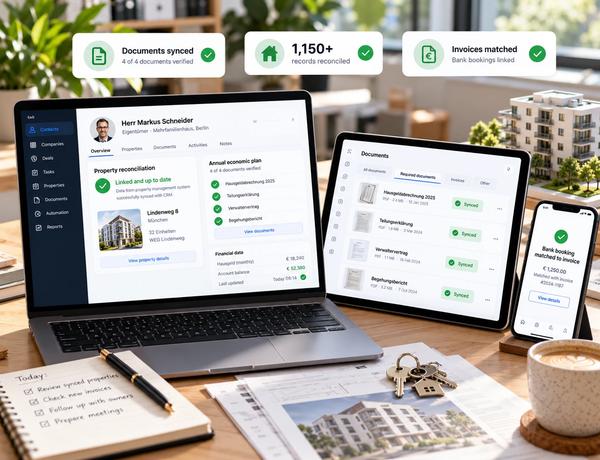
Compliance checks became part of the system
The annual economic plan process now verifies the required documents before generation can continue.
Documents no longer depend on manual uploads
Financial statements and other important documents can move between systems automatically, with duplicate protection.
Financial reconciliation moved into automation
Bank bookings can be matched against invoices and associated with the relevant property and contract.

Making the systems agree.
We did not start by asking, "What can we automate?" We started by asking, "What is actually happening?" Then we built around the answer.
Everything this build touched.
From CRM and automation through engineering, data work, and AI-assisted investigation — the disciplines behind making two systems agree.
CRM & automation
Engineering
 React
React TypeScript
Data
AI-assisted engineering
 Claude
1,150+ property records,
one clear picture.
Within the engagement, the client went from manual checking and assumptions to reconciled data and a measured, real-world number for a proposed automation redesign.
1,150+
property records investigated and reconciled
4
required documents automatically checked before annual plan generation
9%
measured improvement from a proposed automation optimization
2
core business systems connected through automated workflows
Other work
from the same team.

Scattered music systems, now one platform
Distribution, artist and label storefronts, payments, royalties and rights in one place.

Legacy membership workflows, moved to one global platform
Membership, certification and registration for a global professional association, moved to a modern platform.

An ageing subscription platform, modernized module by module
A subscription platform for animal breeders, modernized one module at a time.

Pureblu: the operating system for a pan-India service network
One platform for customers, service partners, technicians, contracts, sales and inventory.


Start a project
Have a similar problem?
Send a brief
We reply within one business day and set up a free 30-minute call.